Loading 3D model
Drag the model to turn it
01 Description
The ED-01 E-Display is an e-paper frame for generative art. A host computer on the same network paints endless images from code (Chinese ink landscapes, birds and fish that never existed, Song-dynasty poems in woodblock type) and the frame shows them on a 4.26″ black-and-white panel. Nothing is stored: a number seeds each painting, and no two are the same.
The frame began as the WF-01 Weather Frame. The hardware and image path are unchanged, and weather is now one of its content modes. The host renders every image; the frame downloads it over Wi-Fi, moves through it with fast partial refreshes and keeps the last image when the network is down. Speed, step size, refresh type and SPI clock are tuned live from a browser page, without new firmware.
Features
- 4.26″ e-paper panel, 800 × 480 px, black and white, 219 ppi; the image stays with no power
- Generative art in two motions: scroll (an 800 px window slides along a 1800 px painting) and card (one whole subject per screen)
- Live tuning from a browser: step interval, step size, full-refresh cadence, SPI clock; measured refresh time shown back
- ESP32-S3 controller with 2.4 GHz Wi-Fi; firmware updates by drag-and-drop over USB
- 1500 mAh LiPo, charged over USB-C; 26 h measured in live mode
- Two-part case with fixed mounts for every part, closed with four corner screws
Applications
Living painting for a desk or wall; weather display; any 800 × 480 1-bit image: pictures, poems, signs and dashboards.
02 Content
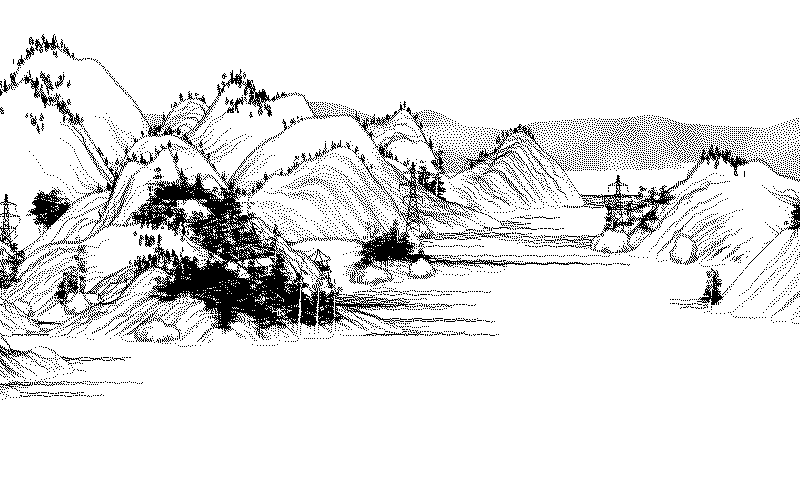
| Style | Motion | Panel fit |
|---|---|---|
| Shan Shui ink landscape | Scroll | Ink lines and dotted mist, native to 1-bit |
| Birds, fish: imaginary creatures as engraving-like line drawings | Card, full refresh | Pure 1-px lines, no dithering |
| Song ci poems, vertical, traditional characters | Scroll or card | Crisp type |
| Calligraphy: a poem in single-line brush strokes | Scroll | Thin lines |
| Nonflowers: Gongbi flowers that do not exist | Scroll | Weak: soft colour washes lose detail |
| Weather: current conditions and a three-day forecast | Static, on wake | Datasheet layout, labels and units |
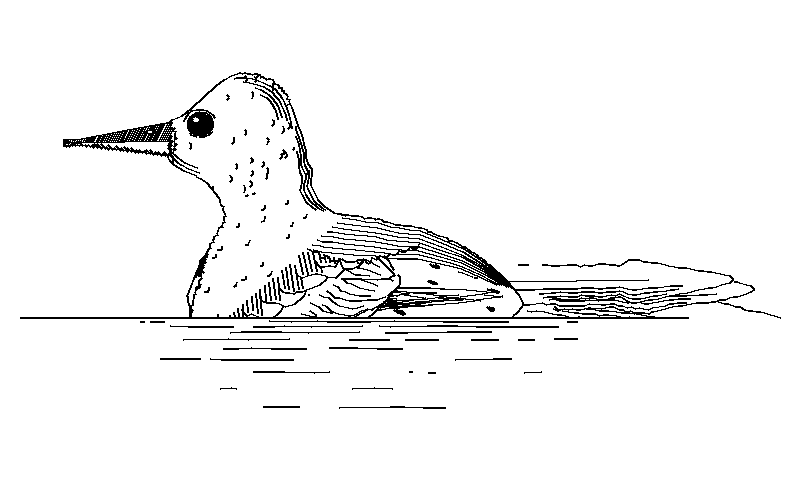
Most styles come from open-source generative art by Lingdong Huang ({Shan, Shui}*, fishdraw, nonflowers, the Qiji woodblock typeface, the Chinese Hershey stroke font) and birddraw, all under MIT or OFL licences.
03 Wiring and pin assignment
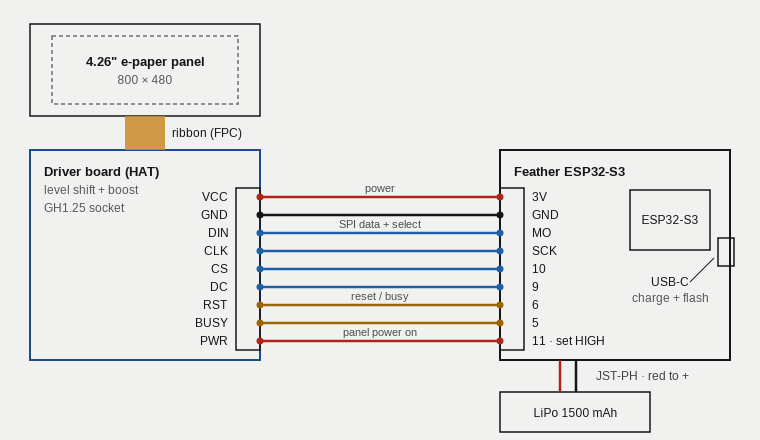
| Driver board | Controller pin | GPIO | Function |
|---|---|---|---|
| VCC | 3V | 3.3 V supply | |
| GND | GND | Ground | |
| DIN | MO | SPI data | |
| CLK | SCK | SPI clock | |
| CS | 10 | 10 | Chip select |
| DC | 9 | 9 | Data / command |
| RST | 6 | 6 | Reset |
| BUSY | 5 | 5 | Busy input |
| PWR | 11 | 11 | Panel power, driven high |
The driver board connects through a 9-pin GH1.25 cable (20 cm). The battery connects to the controller's JST-PH socket.
04 Mechanical
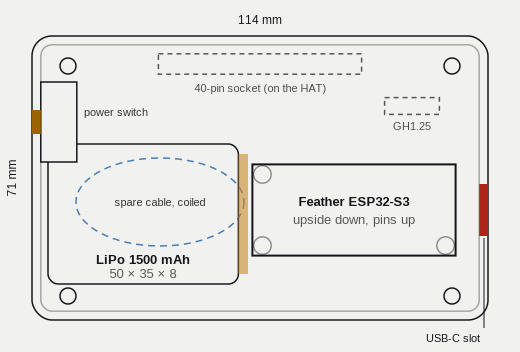
| Parameter | Value | Unit |
|---|---|---|
| Outline | 114 × 71 × 32 | mm |
| Corner radius | 5 | mm |
| Wall | 2.2 | mm |
| Window | 95 × 58, centred on the active area | mm |
| Controller mount | 4 screws, M2, at the board's own holes | |
| Battery | Cradle with 0.5 mm clearance and two strap slots |
| Opening | Position | Size |
|---|---|---|
| USB-C charge and data | Right wall | 13 × 7 mm |
| RESET | Back, guided pinhole | Ø 1.8 mm |
| Keyhole | Back | Wall mount |
The case has two parts, a bezel and a back shell, joined by four corner screws (M2.5, self-tapping). The bezel holds the display in a pocket on locator ribs, and the display's driver board is screwed down at two of its own mounting holes. The shell carries the controller on four standoffs and the battery in a cradle against the left wall, at least 10 mm from the Wi-Fi antenna. A small lid on the back opens over the controller's header pins and the display connector, so they can be probed without taking the case apart. There is no power switch: unplugging the battery connector switches the frame off.
05 Operation
The frame runs in one of two modes, chosen from the tuning page.
| Mode | Wi-Fi | Between steps | Settings apply | Use |
|---|---|---|---|---|
| Live | Always on, reports every ~1 s | Awake | Within ~1 s | Tuning, USB-powered display |
| Battery | Once per painting | Light sleep | At the next painting | Running on battery |
Each painting cycle:
| Step | Action | Limit |
|---|---|---|
| 1 | Download the next painting: 1800 × 480 px, 1-bit | 108 000 B |
| 2 | Full refresh at the start of the painting | 2.4–2.8 s |
| 3 | Move the 800 px window by the step size; partial refresh | 0.88 s typ. |
| 4 | Wait the step interval; full refresh every N steps to clear ghosting | set live |
| 5 | At the end of the strip, fetch the next painting |
Any network failure keeps the current painting on screen and retries.
06 Specifications
Display
| Parameter | Value | Unit |
|---|---|---|
| Panel | GDEQ0426T82 | |
| Diagonal | 4.26 | in |
| Resolution | 800 × 480 | px |
| Colour depth | 1 | bit |
| Pixel density | 8.62 (219) | px/mm (ppi) |
| Active area | 92.8 × 55.68 | mm |
| Panel outline | 105.33 × 62.37 × 0.93 | mm |
| Full refresh, measured | 2.4–2.8 | s |
| Partial refresh, full screen, SPI 20 MHz, measured | 0.88 | s |
| Partial refresh, small window, measured | 0.42 | s |
| Rated life | 1 000 000 refreshes or 5 years | |
| Image retention, unpowered | indefinite |
Controller
| Parameter | Value | Unit |
|---|---|---|
| Module | Adafruit Feather ESP32-S3 | |
| Processor | ESP32-S3, dual-core Xtensa LX7, 240 MHz | |
| Flash / SRAM | 8 MB / 512 KB | |
| PSRAM | none | |
| Wireless | 802.11 b/g/n, 2.4 GHz | |
| Fuel gauge | MAX17048 | |
| Expansion | STEMMA QT (I²C) |
Power
| Parameter | Min | Typ | Max | Unit |
|---|---|---|---|---|
| Battery, LiPo nominal | 3.7 | V | ||
| Battery capacity | 1500 | mAh | ||
| Cut-off, measured | 3.0 | V | ||
| Average draw, live mode (calculated from runtime) | 58 | mA | ||
| Charge input, USB-C | 5 | V | ||
| Recharge, empty to full, measured | 6 | 9 | h |
Battery protection: built-in PCM. Connector: JST-PH 2-pin.
07 Battery life
| Mode | Runtime from full | Basis |
|---|---|---|
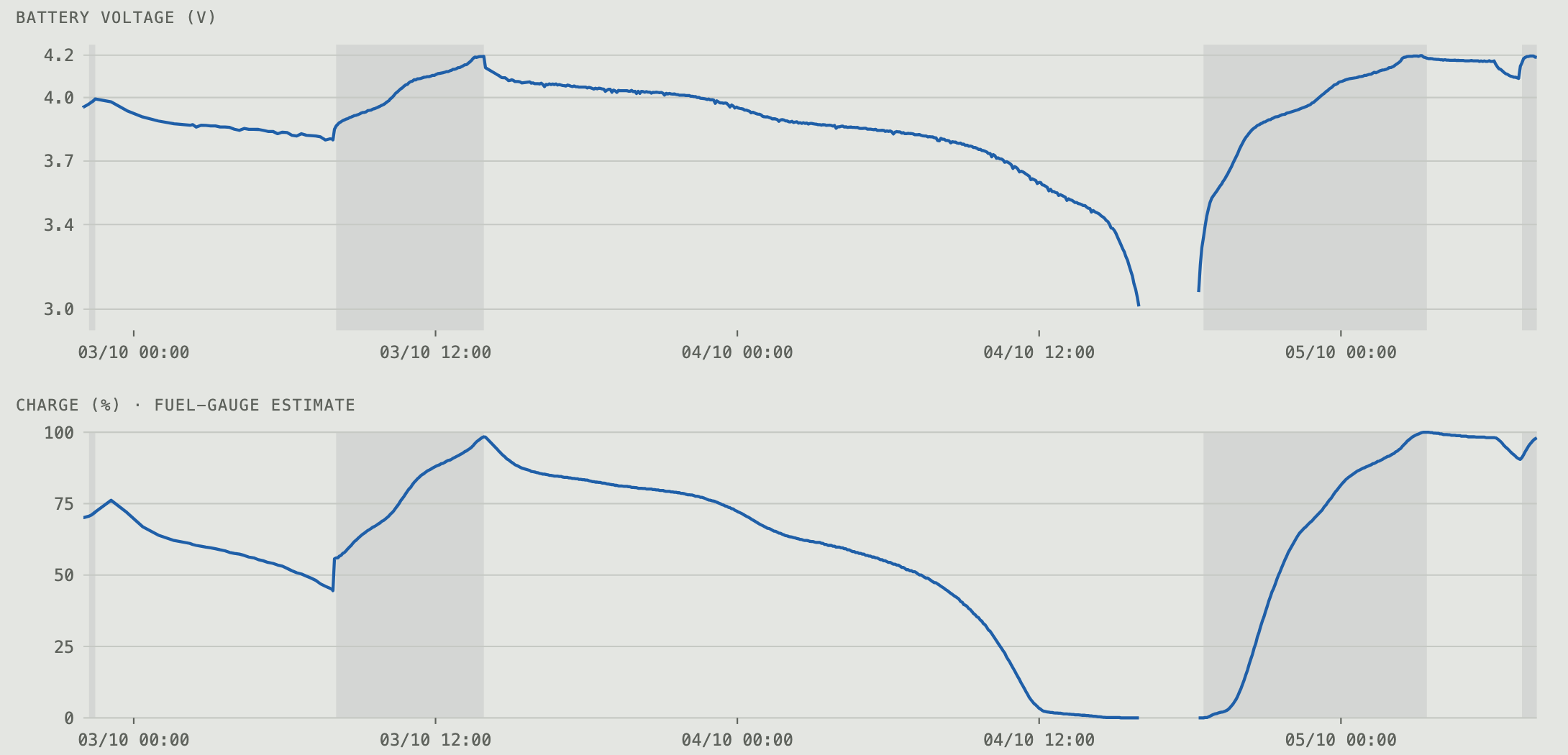
| Live, painting moving every ~0.9 s | 26 h | Measured, full charge to cut-off |
| Battery, Wi-Fi once per painting | to be measured | Next test |
| Weather, deep sleep, update every 30 min | about 4 months, typ. | Calculated, chart below |
Y: runtime, months · X: update intervalEstimate
Show the numbers
| Update every | Days | Months |
|---|---|---|
| 5 min | 26 | 0.9 |
| 15 min | 71 | 2.3 |
| 30 min | 125 | 4.1 |
| 1 h | 200 | 6.6 |
| 6 h | 400 | 13.2 |
| 1 day | 471 | 15.5 |
The voltage is the reliable reading. The fuel gauge's percentage reaches 0 about three hours before the cut-off, so the frame keeps running after it reports empty. In live mode the frame needs daily charging or a permanent USB supply.
08 Lifespan
The panel is rated for 1 000 000 refreshes or 5 years, whichever comes first; partial and full refreshes both count. The pace of the painting decides which limit applies.
| Pace | Refreshes per day | Rated refreshes used up in |
|---|---|---|
| As fast as possible, ~1.1 per second | 95 000 | 10 days |
| One step every 10 s | 8 640 | 4 months |
| One step per minute | 1 440 | 1.9 years |
| One step every 5 min | 288 | 5 years (age limit) |
| Weather, every 30 min | 48 | 5 years (age limit) |
Full speed is for tuning. A drifting painting on a wall steps about once a minute or slower, which keeps the panel within its rating for years.
| Care | Why |
|---|---|
| A full refresh at least once a day | Prevents ghosting and image sticking |
| Store with a white image | Same |
| Keep out of direct sun, heat and humidity | Degrades the panel |
| Avoid daily full discharges | A LiPo typically keeps ~80 % of its capacity for 300–500 full cycles: about one to one and a half years of daily charging |
09 Image format
| Property | Painting strip | Single frame |
|---|---|---|
| Size | 1800 × 480 px, 108 000 bytes | 800 × 480 px, 48 000 bytes |
| Order | Row-major, top row first | Row-major, 100 bytes per row |
| Bit order | Most significant bit = leftmost pixel | same |
| Polarity | 1 = black, 0 = white | same |
| Transport | HTTP GET from the host | same |
Line art is drawn pure black and white. Painted styles and photographs are dithered (Floyd–Steinberg).
10 Assembly
The frame is five layers, stacked from back to front: shell, battery, controller with its cable, display driver board with the panel, and bezel. Select Exploded in FIG. 1 to see them apart, or Inside to see the shell with the display removed.
11 Revision history
| Rev | Date | Change |
|---|---|---|
| 0.6 | 2026-11-14 | Mechanical: corner screws, back access lid, no power switch |
| 0.5 | 2026-11-04 | Inscribed landscape dropped from the content styles |
| 0.4 | 2026-10-17 | Renamed WF-01 → ED-01, E-Display: generative art is the main content mode, weather now one mode among several; live tuning, measured refresh times, battery life and lifespan added; new mounts; mass and Bluetooth rows dropped |
| 0.3 | 2026-10-04 | Full refresh measured on the bench; runtime and mass marked typ. |
| 0.2 | 2026-10-03 | E-Display naming, panel-resolution figure, assembly steps and inside view, controller clock, SRAM and Bluetooth, figure text corrected |
| 0.1 | 2026-09-29 | First release as the WF-01 Weather Frame |